£499 fixed price, or nothing if we miss the mark
Find out what you are wasting on AWS before you pay anyone
An AWS cost audit for UK companies spending £2k to £30k a month. Four questions will give you a rough number today. Connecting a read-only role will give you a real one. The audit itself costs £499 and only if it finds at least 20% of your bill.
No account, no card, nothing to install in your AWS console
What you actually get
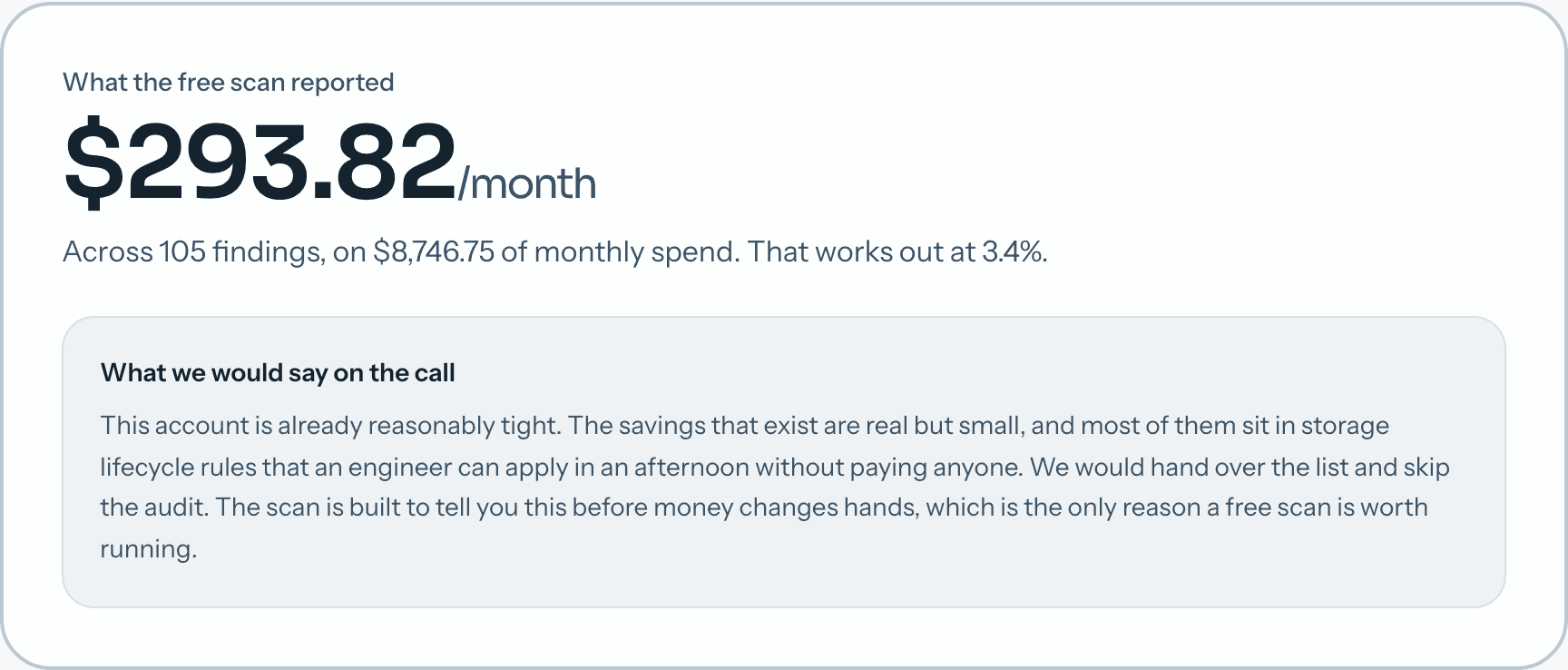
Every screenshot below is a live render of the real scan, not a design mock. You can open the whole thing without giving us anything.
01
Answer four questions
Spend, commitment coverage, when anyone last looked, and roughly what the money goes on. Thirty seconds, no account. You get a range with the arithmetic printed beside every line, so you can disagree with a specific number rather than the whole thing.
What the estimator asks
- ·Monthly AWS spend
- ·How much compute is on a Savings Plan
- ·When anyone last went through the bill
- ·Whether the money goes on servers or storage
02
Connect a read-only role, if you want a real number
A CloudFormation template creates a role in your account that can read cost and configuration data and nothing else. No access keys leave your account. Delete the stack and we are gone that second. Your engineers can read the exact policy before anyone clicks anything.
What the role can read
- ·Cost Explorer figures
- ·Resource configuration: instance types, volume sizes, lifecycle rules
- ·CloudWatch utilisation metrics
- ·Nothing inside S3 objects, databases or secrets
03
The scan runs and reports what it found
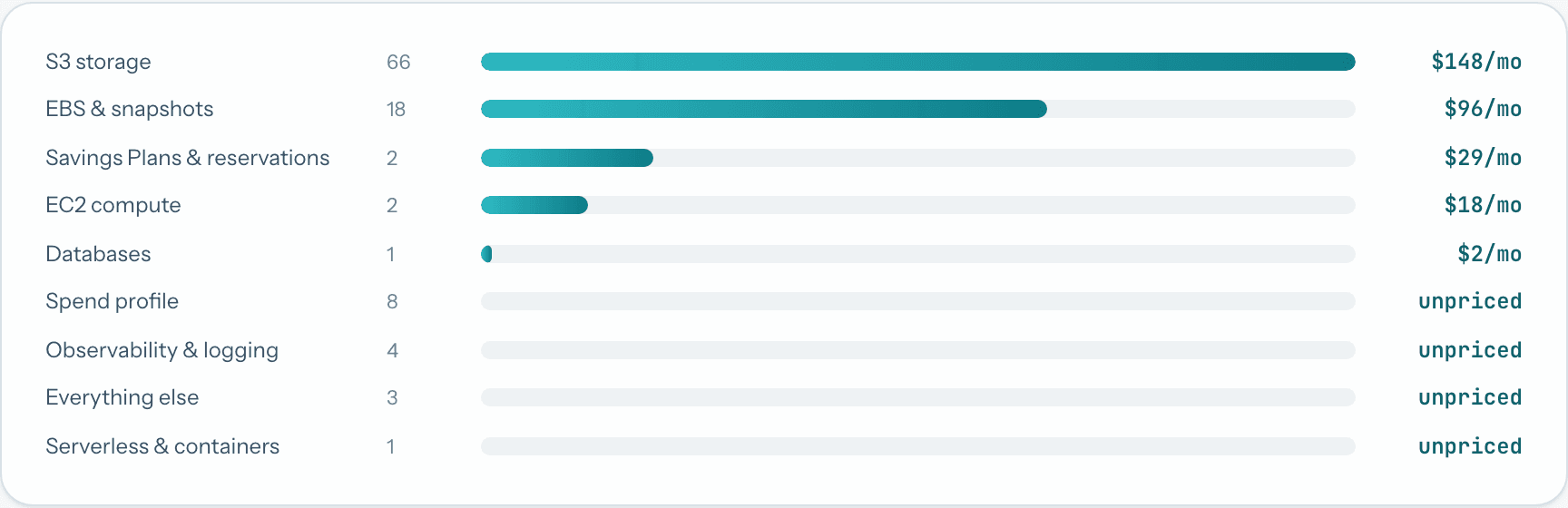
Seventy plus checks across every region with spend in it. On our own account that took 58 seconds across 5 regions. You get a total, a breakdown by category, and the count of findings behind each one.
04
Every finding carries its evidence
A finding is not much use as a category total. Each one names the resource, what it costs today, what the change saves, how risky it is, how long it takes, and the raw evidence the number came from. That is what makes the report something an engineer can act on without re-deriving it.

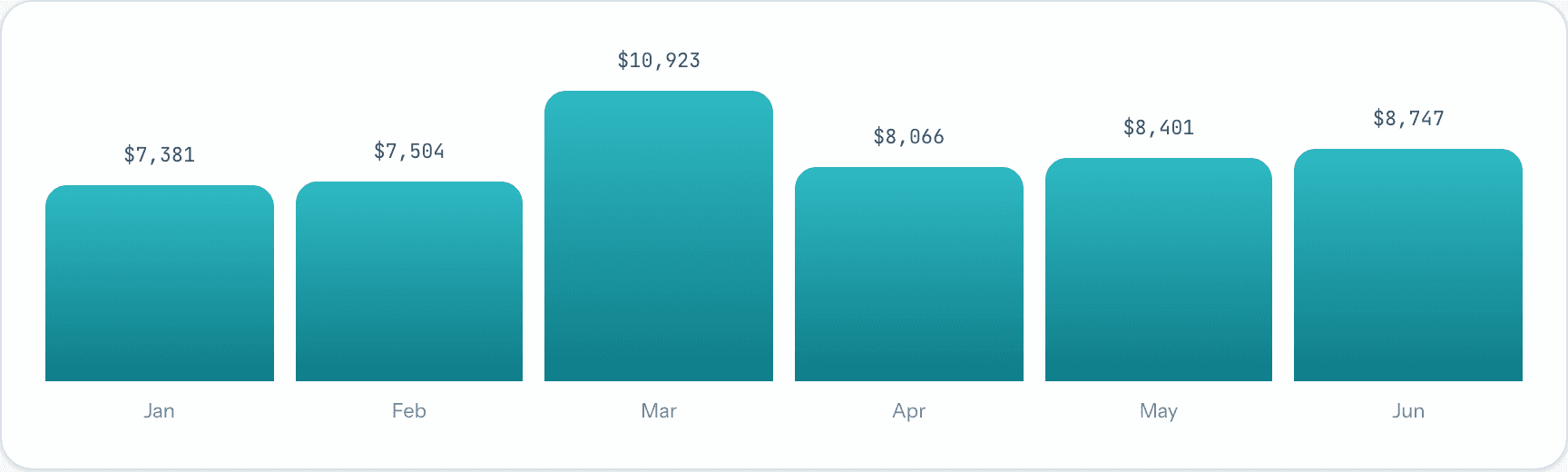
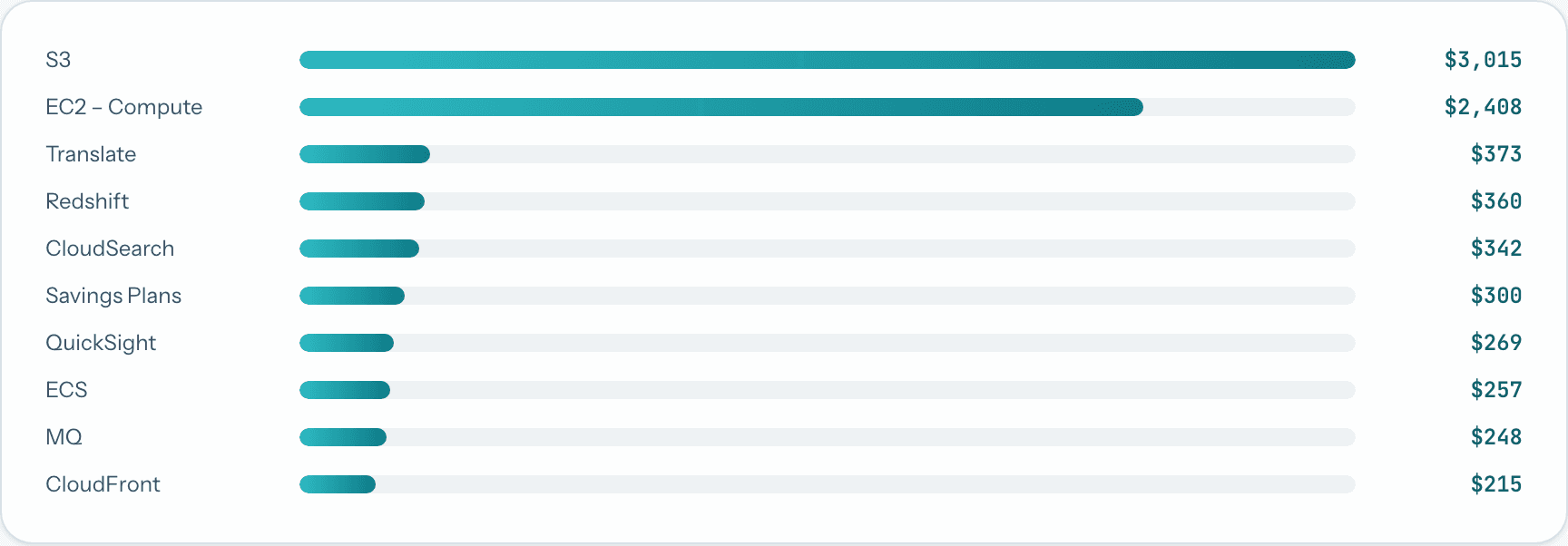
The scan starts by working out where your money already goes
Six months of Cost Explorer history and the top services by spend, before any check runs. It matters because a finding worth $30 a month against a bill dominated by storage is noise, and the same finding on a compute heavy account might be the start of something. The checks are prioritised against this picture rather than run in a fixed order.
What the scan checks
Seventy plus checks, each with its own evidence and its own conservative figure. Ten of them:
Idle EC2 instances
Fourteen days of CPU and network data, not a hunch
gp2 volumes still on gp2
20% off the same storage, no downtime to switch
Savings Plans sizing
AWS's own recommendation engine, one year no upfront
NAT gateway traffic
S3 and DynamoDB traffic that a free VPC endpoint removes
CloudWatch log retention
Log groups set to never expire, quietly filling up
Unattached EIPs and volumes
Every public IPv4 address now costs $3.60 a month
RDS Extended Support
Old engine versions billed at $0.10 per vCPU hour and up
Orphaned snapshots and AMIs
Backups of servers that were deleted years ago
Idle load balancers
Under 100 requests a day, about $18 a month each
DynamoDB billing mode
Provisioned tables sitting at 5% utilisation
Show this page to whoever guards your AWS account
A cross-account role with an ExternalId, carrying ViewOnlyAccess plus the read-only cost APIs it misses. No write access anywhere and no data-plane reads, so no S3 objects, no secrets and no database contents. The full policy JSON is published, which is the only way your engineers can turn us down on the merits.
£499, and only if we find 20%
If the audit does not identify at least 20% of your monthly AWS spend, or £499 a month, whichever is lower, you do not pay for it. The optional monitoring retainer afterwards is £149 a month.
Or work it out yourself first
Everything our audit checks is written up in public, with the AWS list prices attached. Nobody has to buy anything to use it.
Questions engineers ask us
What access do you need?+
A read-only cross-account IAM role that you create from our CloudFormation template. No access keys and no passwords. It can read cost figures and configuration metadata, never the contents of anything. Delete the role and our access ends immediately.
How does the guarantee work?+
If the audit does not find at least 20% of your monthly AWS spend, or £499 a month, whichever is lower, you do not pay for it. We judge that against the conservative estimates in the report rather than a best case. Our own account did not clear that bar, and the scan said so before any money was discussed.
How long does it take?+
The automated scan finished in under a minute on our own account, and a few minutes is typical. The written audit lands within days of the kick-off call rather than the four to six weeks a larger consultancy will quote you.
Do you implement the fixes?+
No. The report gives your team the steps, sorted by how much each one saves against how long it takes. If you want us to keep watching the bill afterwards, the monitoring retainer is £149 a month.
What if my account is already in good shape?+
Then the free scan tells you that and we go away. This is not hypothetical: it is what happened when we scanned ourselves, and the whole result is published on this site.
Is my data safe?+
The role cannot read S3 objects, database contents or secrets, so we never see your application data. Findings are encrypted at rest and deleted 90 days after your audit closes.
Four questions, about thirty seconds, nothing to connect
Who you are dealing with
We are aware that a website asking about your AWS account, with no name attached to it, looks exactly like the thing your security training told you to close. So here are the details you would need to check us out, and the two pages that let you judge the work before you talk to anyone.
The company
- Registered name
- Framz Limited
- Incorporated
- Registered in England and Wales, 2024
- Registered office
- 1 Glamorgan Close, Mitcham, CR4 1XG, United Kingdom
How to reach us
- hello@framz.io
- Phone
- +44 7774 856956
- linkedin.com/company/framz-io
- Parent site
- framz.io
Judge the work first
Neither of these asks you for anything.
- A complete scan of our own account
Every finding, including the total that fell short of our own guarantee.
- The exact IAM policy we ask for
Published in full, so your engineers can reject it on the merits.
We have no client testimonials on this site because we have not finished a paid audit yet. When that changes we will put the names here with permission. Until then the scan of our own account is the only evidence we have, so it is the evidence we show.